Switching IT Providers: The Signs and the Plan for a Quebec SMB

Is your IT provider falling short? Learn the warning signs, what data you own, and how to execute a 90-day transition plan for your Quebec SMB.
You signed with your IT provider a few years ago, and things were running smoothly at first. Now responses are slow, the same issues keep coming back, and you’re wondering whether the contract you pay for every month is still working for you. You’re not alone: many SMB owners across Quebec, from Mauricie to Greater Montreal, face the same hesitation before switching IT providers.
Switching isn’t a small move. Your emails, backups, admin credentials, and support history are all in someone else’s hands. This article gives you the concrete signs that justify a change, what legally belongs to you and must be handed over, a realistic 90-day transition plan, and the one question that truly reveals the worth of a future partner.
Quick answer: You switch IT providers when response times drag out, security stagnates, and nobody is talking strategy anymore. Before you leave, take back control of your credentials, backups, and documentation, then demand a written 90-day transition plan. A well-prepared SMB can make the switch without losing a single email.
1. The Signs It’s Time to Switch
A poor provider doesn’t reveal itself in one outage, but through a buildup of small signals that end up costing you. Here are the ones we hear most often from Quebec SMBs that reach out to us:
- Response times stretch out: a critical incident takes a full day to get addressed, with no written commitment on reaction times.
- Security stagnates: no multi-factor authentication rolled out everywhere, no patch reports, no modern endpoint protection, while threats keep evolving.
- Nobody talks strategy: your provider fixes things, but never offers a plan for the next 12 months.
- The invoices keep surprising you: extras show up for things you thought were included.
- Everything depends on one person: when that technician is on vacation, nothing moves.
- You have no documentation: no hardware inventory, no network diagram, no clear list of your accounts.
If you’re checking three or more of these boxes, the problem isn’t temporary. It’s structural, and it’s reason enough to seriously evaluate a switch.
2. Staying and Renegotiating vs. Switching: A Comparison
Leaving isn’t always the first step. Sometimes a provider responds well when you spell out your expectations in writing. Here’s how to weigh both options.
| Criterion | Stay and Renegotiate | Switch Providers |
|---|---|---|
| Effort | Low: one meeting and a revised contract | Medium: a planned transition over a few weeks |
| Risk | Old habits tend to come back | Low if credentials and backups are secured first |
| Power dynamic | You remain dependent on the same point of contact | You start fresh with clear, written expectations |
| Security | Improved only if the provider is willing | Full security update from day one of onboarding |
Renegotiating works for the SMB whose provider is competent but poorly organized: the problems stem from a lack of written commitments, not a lack of skill. Switching works for the one that has lost confidence, is dealing with repeated security incidents, or has realized the provider simply doesn’t have the capacity to help them grow.
3. What Belongs to You and Must Be Handed Over
This is the point that worries business owners most, and often needlessly: the law and common sense are on your side. The following belongs to you, regardless of who manages it today:
- Your domain name and access to the registrar.
- Your Microsoft 365 or Google environment, including global administrator roles.
- Your backups and an exportable copy of your data.
- The list of your accounts, licenses, and admin passwords.
- Your network documentation: IP addressing plan, equipment inventory, firewall configuration.
Your employees’ and clients’ personal information also belongs to you: Quebec’s Law 25 makes you responsible for its protection, which means you must be able to retrieve and transfer it. A provider that holds your credentials hostage puts itself in an untenable position. Document every request in writing and set a deadline. In the vast majority of cases, simply citing your legal obligations is enough to get things moving.
4. The 90-Day Transition Plan
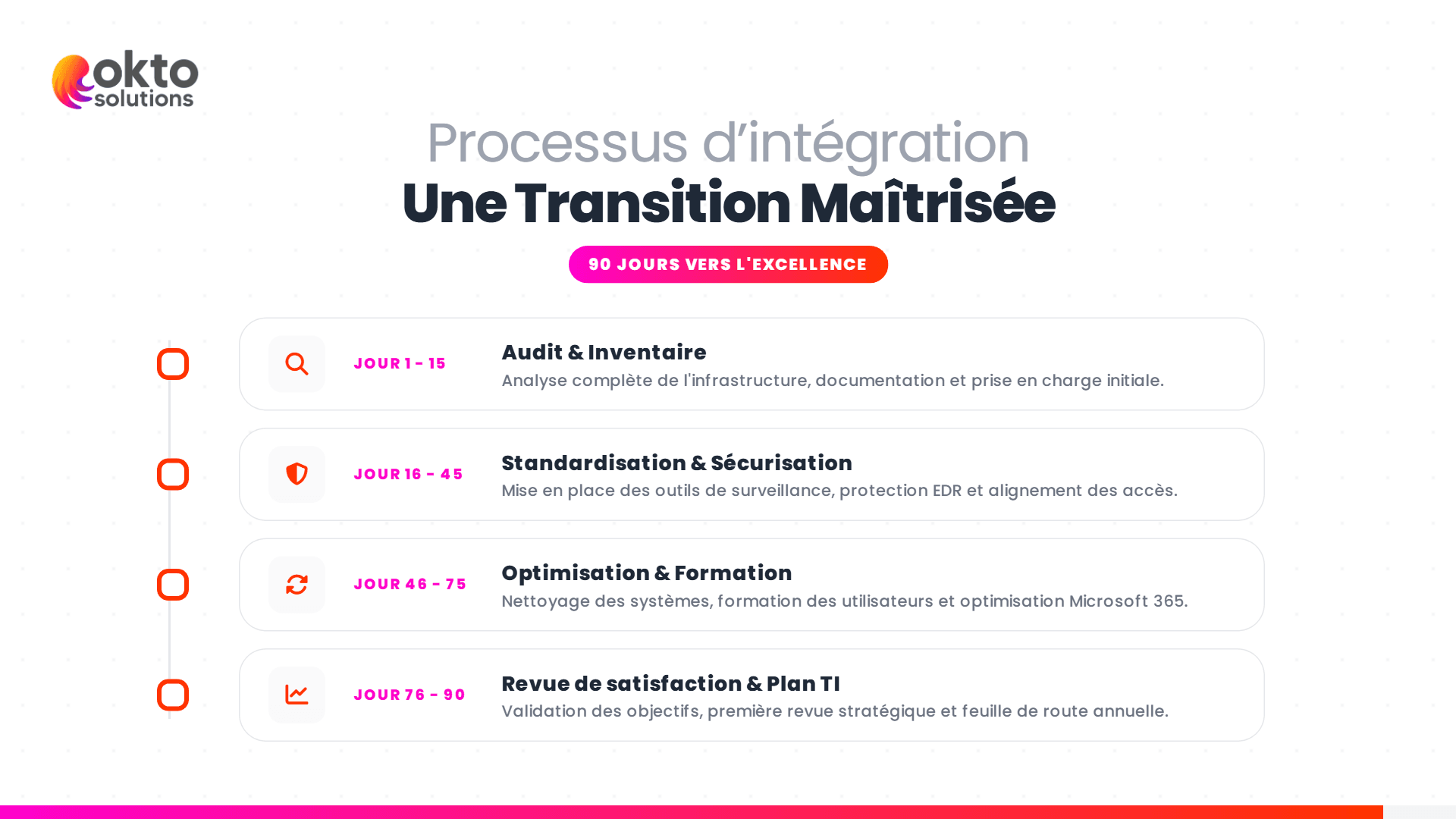
A good transition unfolds in three phases. This is the approach we use with SMBs in Trois-Rivieres and across Quebec, and it avoids unwanted surprises.
Days 1 to 30: Discovery and Emergency Security
We build a full inventory of your environment, recover and verify your credentials, enable multi-factor authentication everywhere, and confirm your backups are actually working. This is also when the most glaring vulnerabilities get flagged. Our managed services take over from your outgoing provider with no service interruption.
Days 30 to 60: Stabilization
We apply overdue patches, clean up inactive accounts, upgrade endpoint protection, and document everything that wasn’t already documented. Your team starts to notice the difference: requests are tracked and deadlines are met.
Days 60 to 90: Optimization and Strategy
We shift from repair mode to prevention mode: a continuity plan, a 12-month roadmap, a predictable budget. This is where a good partner stops being a repairperson and becomes an advisor. To strengthen the security side of your transition, the Canadian Centre for Cyber Security publishes practical guidance for SMBs.

5. Exit Clauses to Review Before Signing With Anyone New
Before committing to a new partner, pull out your current contract and read these points carefully:
- The termination notice period: 30, 60, or 90 days makes a big difference in planning.
- License ownership: are they in your name or the provider’s?
- Exit fees: some contracts charge for data return or offboarding assistance.
- The handover obligation: the provider must return your credentials, data, and documentation within a reasonable timeframe.
- The non-deletion clause: no data should be destroyed before the migration is complete.
If any of these clauses is vague or missing, get clarification in writing before announcing your departure. That’s your best protection.
6. The Question to Ask Your Next Provider
When you’re shopping for an IT services provider in Quebec, one question separates the serious ones from the rest: what exactly happens during my first 30 days, and who do I call when something’s on fire on a Friday afternoon?
A solid partner answers with a specific plan, names, written response times, and an emergency process. The red flag is a vague answer like "we handle everything, don’t worry," with no written plan and no committed numbers. A poorly structured transition is exactly what pushed you to switch providers in the first place: don’t start fresh with the same blind spots.
Frequently Asked Questions
How long does switching IT providers take?
For an SMB with 5 to 100 employees, plan on 30 to 90 days depending on the size of your environment and your current contract’s notice period. Securing credentials and backups happens in the first few days; the rest rolls out from there without any service interruption.
Could I lose my emails or data?
Not if the transition is planned properly. Your emails and files belong to you and stay in your Microsoft 365 or Google environment. A good partner verifies backups before touching anything and migrates without service interruption.
Can my old provider refuse to hand over my credentials?
Your data, personal information, and admin credentials belong to you. Law 25 makes you responsible for their protection, which means you must be able to retrieve them. A written request with a deadline almost always resolves the situation.
A Local IT Partner in Quebec
Switching providers is a business decision, not just a technical one. Done well, it gives you back reliable response times, up-to-date security, and a real roadmap. OKTO Solutions supports SMBs in Mauricie and across Quebec through this transition with no loss of service. Explore our managed services for SMBs or reach out through our contact page to schedule a no-obligation introductory meeting.
This kind of task goes quickly when someone else takes care of it: our IT support, our managed IT services and our IT services in Trois-Rivieres.